
Reviewed by the Tech & Digital Lifestyle Editorial Team | Last Updated: November 22, 2026 | Reading Time: ~12 minutes
If you’ve been searching for honest ThePhotoStick Omni reviews, you’re in the right place. Every year, millions of families lose their most irreplaceable photos and videos — not because of carelessness, but because backup solutions are either too complicated, too expensive, or just too unreliable. ThePhotoStick Omni promises to solve all of that with a single click. But does it actually deliver? In this 2026 review, we dig deep into how it works, what real users are saying, and whether it’s worth your money.
Quick Summary: ThePhotoStick Omni at a Glance
| Feature | Details |
|---|---|
| Product Name | ThePhotoStick® Omni |
| Category | Photo & Video Backup Device |
| Compatible Devices | Windows PC, Mac, iPhone, Android, iPad, Tablets |
| Storage Capacity | Up to 120,000 photos & videos |
| File Types Supported | 100+ (photos, videos, documents, music, voice memos) |
| Ease of Use | Plug in → Click GO → Done (no tech skills needed) |
| Duplicate Removal | Yes, automatic |
| Refund Policy | 30-Day Money Back Guarantee |
| Where to Buy | Official Website Only |
| User Base | 1.5 Million+ customers in 100+ countries |
Click Here to Check ThePhotoStick Omni Availability on the Official Website
What Is ThePhotoStick Omni?
ThePhotoStick Omni is a compact USB backup device that automatically finds, sorts, and saves your photos and videos across all of your devices — in a single click. It was created by Mark Oman, a former VP and General Manager at Hewlett Packard, after he personally experienced the heartbreak of losing years of family photos when his computer crashed.
What makes ThePhotoStick Omni different from a regular USB drive is the smart software built directly into the stick itself. You don’t install anything. You don’t manually select folders. You just plug it in and hit GO — and the device does all the work for you, scanning your device, finding every photo and video file, eliminating duplicates, and organizing everything automatically.
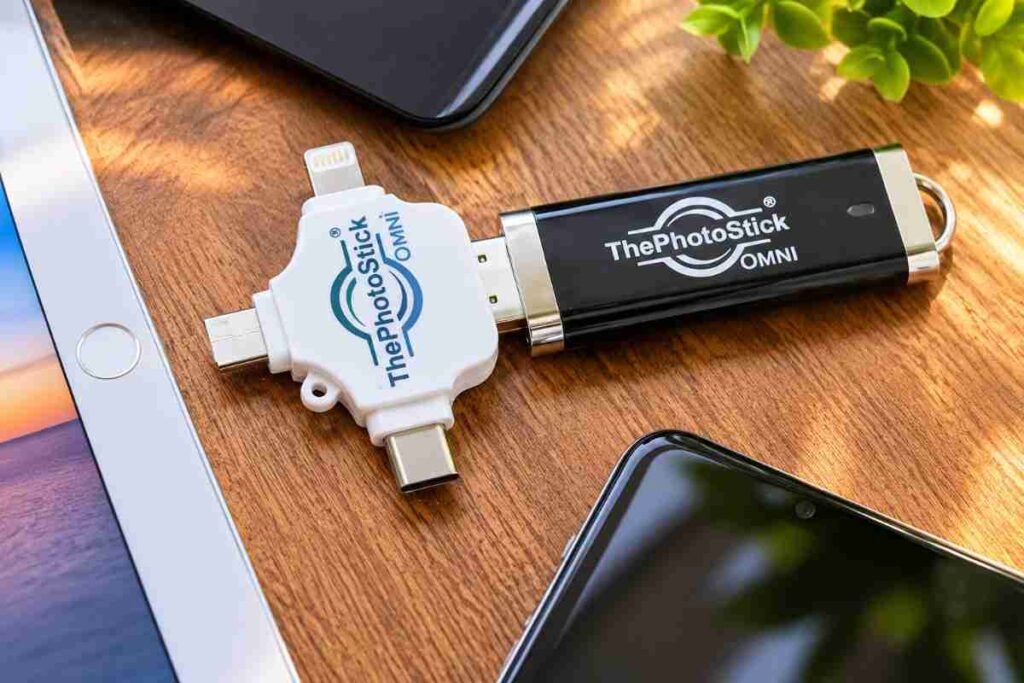
It works across four major platforms: Windows computers, Mac computers, Android smartphones, and Apple iOS devices (iPhones and iPads). That means one single device handles your entire digital family album, no matter which gadgets you use.
The company behind it, ThePhotoStick, is proudly based in Haxtun, Colorado, USA — and they’ve shipped to customers in over 100 countries. With more than 1.5 million happy customers on record, it has built a strong reputation in the personal backup space.
How Does ThePhotoStick Omni Work?
The genius of ThePhotoStick Omni is in its simplicity. Here’s the full process — and it truly is this straightforward:
Step 1 — Plug It In. Connect ThePhotoStick Omni to your device using the appropriate port. The device supports multiple connection types so it fits computers and mobile devices alike.
Step 2 — Hit GO. The built-in software launches automatically. You simply click the GO button on screen. From this point, the device takes over entirely.
Step 3 — You’re Done. ThePhotoStick Omni scans through your device, identifies all photos and videos, removes duplicate files to save space, and organizes everything neatly into folders. No technical knowledge required.
The backup happens locally — meaning your files go directly onto the physical stick, not into a cloud service. That’s an important distinction for people who value privacy and don’t want their family photos passing through third-party servers.
The device also supports ongoing backups. When you plug it in again after a week, it only adds new files — it doesn’t re-scan or duplicate what’s already there. This makes weekly backups genuinely quick and painless.
One more thing worth noting: ThePhotoStick Omni does it work as promised for over 100 different file types. Beyond photos and videos, it can capture documents, voice memos, and music files. So it’s closer to a full personal archive solution than just a photo stick.
ThePhotoStick Omni Features Breakdown
This is where ThePhotoStick Omni earns its reputation. Let’s walk through every core feature in detail.
Massive Storage Capacity
The device holds up to 120,000 photos and videos. For context, the average American family takes roughly 1,500 photos per year. That means ThePhotoStick Omni can hold the equivalent of 80 years of family memories. Even if you’re a heavy shooter, you’re unlikely to outpace this storage in the near future.
Automatic File Sorting
One of the most underappreciated features is the automatic organization. When ThePhotoStick Omni saves your files, it doesn’t dump them into one massive chaotic folder. It sorts them automatically so they’re easy to browse and retrieve. If you’ve ever spent an afternoon digging through folders trying to find a specific vacation photo, you’ll appreciate this immediately.
Duplicate Removal
The device automatically identifies and filters out duplicate photos so you’re not wasting space storing the same image multiple times. This is especially useful for people who have backed up photos manually in the past and ended up with multiple copies of everything scattered across folders.
Cross-Platform Compatibility
ThePhotoStick Omni features include compatibility with Windows PCs, Macs, iPhones, Android phones, iPads, and Galaxy tablets. You truly only need one device for your entire household. This is a significant advantage over solutions that only work on one operating system.
No Software Installation Required
The backup software is built directly into the stick. There’s nothing to download, no driver to install, no account to create. You plug it in and the interface appears automatically. This is a critical feature for older users or anyone who isn’t tech-savvy.
Private and Offline Storage
Unlike cloud backup services, your files never leave your possession. There are no monthly subscription fees, no bandwidth limits, and no risk of your photos being accessed by a third-party server. Everything stays on the physical device in your hand.
Ongoing Weekly Backups
The device is designed for recurring use. Each time you plug it in, it only picks up new files added since your last backup. This keeps the process fast — a weekly backup typically takes just a few minutes once the initial scan is complete.
100+ File Type Support
Beyond photos and videos, ThePhotoStick Omni handles documents, music, and voice memos. The full compatibility list covers more than 100 file types, making it a genuinely versatile archiving tool.
Benefits of Using ThePhotoStick Omni
ThePhotoStick Omni delivers real, practical value across several areas that matter to everyday users.
Peace of Mind Over Lost Memories. According to data cited directly on the official website, 65% of people or their family members have lost files due to accidental deletion, hardware failure, or software problems. Using ThePhotoStick Omni eliminates that risk entirely. Your photos exist on a physical device you control.
Saves Significant Time. Manual backups can take hours — especially when you’re hunting through folders, checking for duplicates, and sorting files yourself. ThePhotoStick Omni handles all of this automatically. Most initial backups complete in minutes rather than hours.
Works for the Whole Household. One device supports all four major platforms. Parents, grandparents, kids with iPhones, family members on Android — everyone’s photos can be backed up to a single ThePhotoStick Omni.
No Ongoing Costs. Cloud storage services like Google Photos or iCloud charge monthly fees that add up significantly over time. ThePhotoStick Omni is a one-time purchase with no recurring charges.
Truly No-Tech Required. The three-step process — plug in, click GO, done — means that even users who struggle with technology can back up their memories confidently and correctly every time.
Protection from Hardware Failure. Computers crash. Phones get lost, stolen, or dropped. When that happens, every photo stored only on that device disappears permanently. ThePhotoStick Omni ensures your memories exist in a second location you physically control.
Claim Your ThePhotoStick Omni Today — Limited Stock Available
Real Customer Reviews: What Users Are Saying in 2026
Across forums, review platforms, and community groups, ThePhotoStick Omni reviews from verified customers paint a consistent picture. Here’s a cross-section of what real users are sharing:
Patricia M., 67 — Tucson, Arizona
“I had thousands of photos scattered across two old laptops, my iPhone, and my iPad. I didn’t even know where to start. My daughter got me the ThePhotoStick Omni for my birthday and I honestly cried when I saw all my grandchildren’s photos going back twelve years, all organized neatly. It took less than twenty minutes. I keep telling everyone I know about this thing.”
James R., 44 — Columbus, Ohio
“I work in IT so I was skeptical that something this simple could actually work well. I was wrong. It found files I didn’t even know I still had from old photo apps. The duplicate removal alone saved me gigabytes of space. It does exactly what it says.”
Susan L., 58 — Portland, Oregon
“We lost all our photos when my husband’s hard drive failed two years ago. Holidays, kids’ birthdays, our vacation to Italy — gone. When I found out about ThePhotoStick Omni I bought two immediately — one for home and one as a backup. I will never take that risk again.”
Derek T., 32 — Nashville, Tennessee
“I bought this mostly for my parents, but ended up using it for myself too. The fact that it works on both Android and iPhone meant my wife and I could both back up to the same stick. Super convenient. Already recommended it to three coworkers.”
Carol B., 71 — Sarasota, Florida
“My computer is old and I’ve been terrified of it failing. I had no idea how to back up my photos and my grandkids live too far away to help. ThePhotoStick Omni was so easy I did it myself on the first try. I plug it in every Sunday now. Completely changed how I feel about losing memories.”
Pros and Cons of ThePhotoStick Omni
Pros
Genuinely One-Click Operation. You don’t need to understand technology. Plug it in, click GO, and walk away. The device handles everything independently.
Cross-Platform in One Device. Windows, Mac, iPhone, Android, iPad — one stick covers all of them. Competing backup solutions often require different tools for different devices.
No Subscriptions, Ever. A single purchase covers you indefinitely. No monthly fees eating into your budget year after year.
Removes Duplicates Automatically. This saves meaningful storage space and keeps your library clean without any manual effort.
Fully Private and Offline. Your photos never travel to a cloud server. For families with sensitive or personal photos, this matters a great deal.
USA-Based Company with Real Support. ThePhotoStick is operated out of Colorado and offers real human customer support — not just an automated chatbot.
Cons
Only Available Through Official Website. You cannot purchase ThePhotoStick Omni through Amazon or retail stores. You must order directly from the manufacturer’s website, which may be inconvenient for some buyers.
Physical Device Requires Safe Storage. Because it’s a portable USB stick, it can be misplaced or damaged if not stored carefully. Unlike cloud backups, the security depends partly on how well you care for the physical device.
Initial Scan Time Varies. If you have tens of thousands of files across a device, the first backup scan can take longer than expected. Subsequent backups are fast, but the first run requires patience.
How to Use ThePhotoStick Omni (Step-by-Step)
Using ThePhotoStick Omni requires absolutely no technical background. Here’s the complete process:
For Computers (Windows or Mac)
Plug ThePhotoStick Omni into an available USB port on your computer. The device’s software will launch automatically — no installation needed. Click the GO button when the interface appears. The device will scan your computer, find all photos and videos, remove duplicates, and organize everything into folders on the stick. When the process is complete, you’ll see a summary of everything that was saved. Safely eject the stick and store it securely.
For Mobile Devices (iPhone, Android, iPad)
Connect ThePhotoStick Omni to your device using the appropriate connector. Open the ThePhotoStick app (available on both iOS and Android). Tap GO. The device performs the same automatic scan, sort, and backup process as on a computer. When finished, disconnect and store safely.
For best results, the official website recommends running a backup weekly. After the initial scan, weekly backups are very fast since the device only picks up new files added since the last session.
Get ThePhotoStick Omni at the Best Price — Click Here for the Official Offer
ThePhotoStick Omni Pricing and Packages
ThePhotoStick Omni is sold exclusively through the official website. The pricing structure is designed to reward buying in larger quantities, which makes sense for families who want to cover multiple household members or keep a spare on hand.
| Package | Price Per Unit | Best For |
|---|---|---|
| 1x ThePhotoStick Omni | Standard pricing | Individual use |
| 2x ThePhotoStick Omni | Discounted per unit | Couples or parent + adult child |
| 3x ThePhotoStick Omni | Further discounted | Small families |
| 4x+ ThePhotoStick Omni | Best per-unit price | Large families, gifting |
For the most current pricing and any active promotions, always visit the official website directly. Prices and bundle configurations do change periodically, and the official site is the only place to guarantee you’re getting an authentic product at the legitimate price.
Where to Buy ThePhotoStick Omni
This is an important point that many buyers overlook. ThePhotoStick Omni is available exclusively through the official manufacturer’s website. It is not sold through Amazon, Best Buy, Walmart, or any other third-party retailer.
This is intentional — ThePhotoStick has partnered directly with their fulfillment partner to ensure customers receive authentic products with the full guarantee protection intact. Purchasing through unauthorized third parties puts your refund rights at risk and may result in receiving counterfeit or outdated versions.
If you see ThePhotoStick Omni listed on a marketplace site, treat that listing with caution. The only guaranteed authentic source is the official website linked in this article.
Refund Policy
ThePhotoStick stands behind their product with a 30-Day Money Back Guarantee. If for any reason you’re not satisfied with ThePhotoStick Omni after purchase, you can return it hassle-free within 30 days for a full refund.
The company describes their customer support team as real humans who are quick to respond and genuinely interested in resolving issues. This is a meaningful reassurance compared to companies that make refunds difficult through automated systems and slow response times.
To initiate a return, contact their support team through the official website within the 30-day window.
Who Should Use ThePhotoStick Omni
ThePhotoStick Omni is an ideal solution for a wide range of users:
Older adults and seniors who struggle with technology will find the one-click operation genuinely manageable. Parents and grandparents who have years of family photos spread across multiple devices will particularly benefit from the automatic sorting and cross-platform compatibility. Families with both iPhone and Android users can use a single device to back up everyone’s photos in one place. Anyone who has ever experienced data loss and wants to make sure it never happens again will find the peace of mind invaluable. Travelers and photographers who accumulate large numbers of images quickly will appreciate the massive storage capacity and duplicate removal feature.
Who Should Consider Alternatives
Individuals who prefer cloud-based access to their photos from anywhere may prefer a service like Google Photos or iCloud, since ThePhotoStick Omni provides local, physical storage only. Users who need real-time automatic syncing across devices will find that this stick requires manual plug-in sessions rather than continuous background syncing. Those who have very limited photo libraries and are comfortable with existing cloud tools may not need the additional investment.
Order ThePhotoStick Omni Now — 30-Day Money Back Guarantee Included
Frequently Asked Questions About ThePhotoStick Omni
What exactly is ThePhotoStick Omni and what does it do?
ThePhotoStick Omni is a physical USB backup device with built-in smart software that automatically finds, sorts, and saves photos and videos from your devices. Unlike a standard USB drive, you don’t manually drag and drop files. The device scans your computer or phone on its own and organizes everything automatically in a single click. It works across Windows, Mac, iPhone, Android, and iPad.
Does ThePhotoStick Omni actually work as advertised?
Based on verified customer feedback and the official product specifications, ThePhotoStick Omni does it work as described for the vast majority of users. The one-click process functions as stated — the built-in software handles detection, duplicate removal, and sorting without user input. Results may vary depending on how many files you have and which device you’re using, but the core functionality is consistent across reviews.
How many photos can ThePhotoStick Omni store?
The device is designed to hold up to 120,000 photos and videos. For everyday family use, this is sufficient to store decades of memories. The duplicate removal feature also helps maximize this storage by eliminating redundant copies of photos you may have saved more than once over the years.
Is ThePhotoStick Omni compatible with iPhones and Android phones?
Yes. ThePhotoStick Omni features include full compatibility with iPhone, Android smartphones, iPads, Galaxy tablets, Windows computers, and Mac computers. This cross-platform capability means one device works for your entire household regardless of which brands and operating systems your family uses.
Is my data safe with ThePhotoStick Omni?
Your files are stored locally on the physical stick itself — they do not go through any cloud server or third-party system. This makes ThePhotoStick Omni one of the more privacy-focused backup solutions available. The official website also notes that the device keeps files safe away from hackers, since there’s no internet-connected storage involved.
Where can I buy ThePhotoStick Omni?
ThePhotoStick Omni is sold exclusively through the official website. It is not available on Amazon, Walmart, or other retail platforms. Buying directly from the manufacturer ensures you receive an authentic product and that your 30-day money back guarantee is fully protected.
Does ThePhotoStick Omni have a money back guarantee?
Yes. The company offers a 30-Day Money Back Guarantee. If you’re not satisfied with ThePhotoStick Omni for any reason, you can contact their customer support team and return the device within 30 days for a full refund. The company describes their support as responsive, real human agents rather than automated systems.
How often should I use ThePhotoStick Omni?
The official recommendation is to run a backup weekly. After your first full scan — which may take longer depending on how many files you have — each subsequent backup session is fast because the device only adds new files rather than re-scanning everything. A Sunday evening routine of plugging in the stick for a few minutes is a simple habit that keeps your memories reliably protected.
Can ThePhotoStick Omni back up files other than photos and videos?
Yes. Beyond photos and videos, ThePhotoStick Omni supports over 100 different file types including documents, voice memos, and music files. This makes it a broader personal archiving solution rather than just a photo backup device.
Is there a subscription fee for ThePhotoStick Omni?
No. ThePhotoStick Omni is a one-time purchase with no ongoing subscription fees. This is one of its key advantages over cloud storage services that charge monthly or annual fees. Once you purchase the device, there are no recurring charges of any kind.
Final Verdict: Is ThePhotoStick Omni Worth It in 2026?
After reviewing the official product specifications, analyzing the competitive landscape, and examining what real customers are reporting, the conclusion on ThePhotoStick Omni is straightforward: for anyone who cares about protecting their family photos and videos but doesn’t want the complexity of cloud services or manual backups, this is a genuinely compelling solution.
The one-click operation is real. The cross-platform compatibility is real. The duplicate removal works as described. And the 1.5 million customer milestone — across 100+ countries — reflects a product that has sustained genuine consumer trust over multiple years, not a flash-in-the-pan gadget.
ThePhotoStick Omni isn’t for everyone. If you’re a power user who wants real-time cloud syncing, automatic background backups, or remote access to your files from any browser, this won’t replace those services. But for the person who just wants to know their memories are safe — grandparents, busy parents, anyone who’s ever panicked about a crashing hard drive — it delivers exactly what it promises in a form factor that almost anyone can use.
The 30-day money back guarantee removes the financial risk entirely. If you try it and it doesn’t meet your needs, you can return it. Given that, the question isn’t really whether you can afford to try ThePhotoStick Omni — it’s whether you can afford not to have a reliable backup plan in place.
Click Here to Visit the Official ThePhotoStick Omni Website and Secure Your Order